Page 17 of 37
Re: Questions & Answers
Posted: Thu Feb 21, 2019 11:52 am
by Traderathome
piratetrader wrote:Hello, I am having some trouble with my charts. So I am posting this in the QandA so you can help me out..
today I traded XAU/usd ..
As you can see all trends stacked bearish and nice zig zag pattern breakout and then i entered on a retrace back to the breakout point. but since hitting the TP the trades are not displaying on my chart. Since TAH has forbidden me from posting in trading room without showing tp can someone help me out why its not displaying. I am not saving this pic like tah said as i want to show order panel also.
Fair Warning Given.....
The main reason is
you have not done your HOMEWORK! Closed trade PL labels are....by external inputs...."told" to appear within "x" pips of the last EP closed and within "y" minutes of the time of that EP close. Both "x" and "y" are user changeable! All is explained in the User Notes for the Trade Levels indicator!
It is clear to see that you might not yet be an adult, just a child that wants to play instead of doing work. You are scribbling on your charts because you have not taken the time to learn how to use the MT4 built-in feature to put text labels on your charts!
I do not know what you have against reading and learning, but it is a
BOTHER to others to have to lead you by the nose to find the answers that have painstakingly been provided for you
ALREADY!
Please do your HOMEWORK and do not be
RUDE and bothersome to others that have done theirs.
To become a successful trader is not easy! In fact, the MMs make it sufficiently difficult that most folks lose all their money trying! It requires knowledge, a sufficient amount of money to start with, patience and discipline. If you are an adult, but do not have the patience and discipline to even just read and absorb knowledge, quit while you are ahead......because if you ever go live, your account will quickly die!
All this might sound harsh to you, but it is all said with good intentions and best wishes for you and the tasks you have ahead of you.
Sincerely,
Tah
Re: Questions & Answers
Posted: Tue Feb 26, 2019 10:57 am
by piratetrader
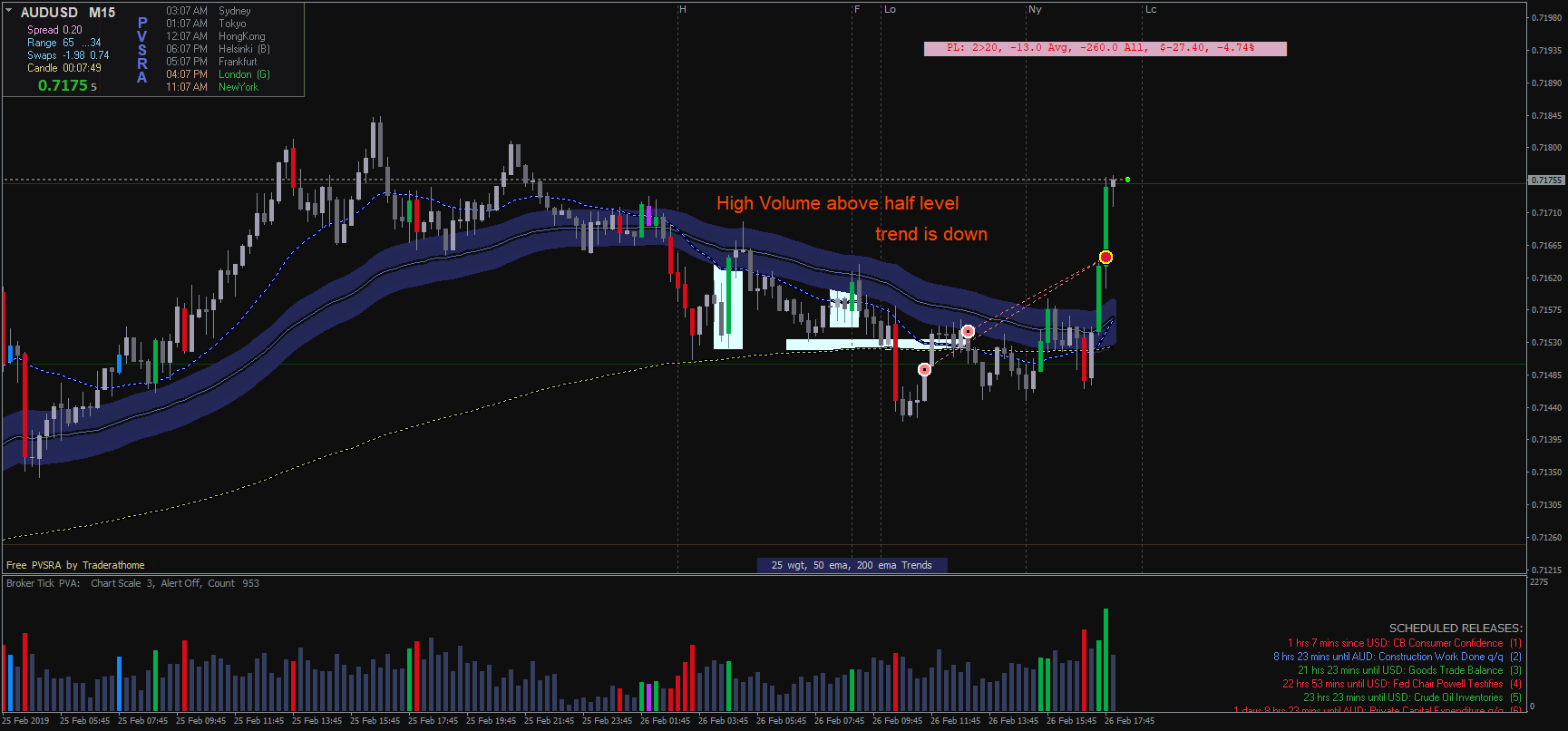
Tah I have been reading the posts again and again and have been trading on demo. this is a trade I took today that was a loss. I request you to have a look at it and tell me if I did everything correctly
London session Trade
Trend Angle Is Down. Price below trend. stacked bearish
High volume multiple PVA bar above half level
LH-LL-LH - Entered on a retrace back to LH
Thanks
- AUDUSDM15.png (72.4 KiB) Viewed 33656 times
Yes, you did everything right. Looked bearish all the way until the NYS MMs decided to pop it! A stop hunt? The start of a reversal? At the time it begins we can never know. And so, not only did you do everything correctly, you are to be congratulated on quickly closing the trade! In my opinion, of the choices to hold, to hold and add, to fold, to fold and switch, you did the best one! This one should become a habit. It will save you a lot of money. 
-Tah
Re: Questions & Answers
Posted: Sat Mar 02, 2019 6:16 am
by stefanik
Hi everyone
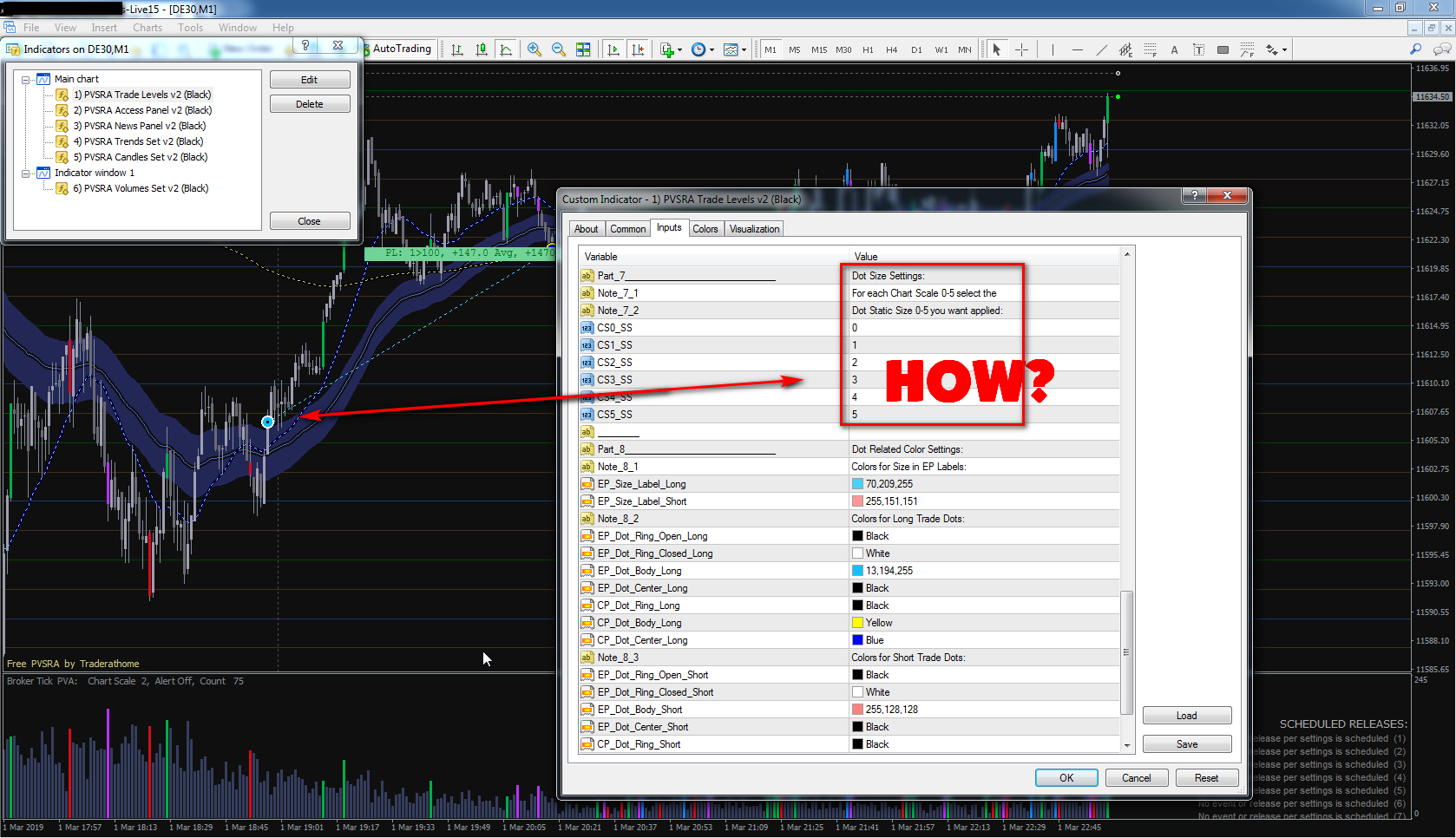
I looking but I can't find when I can change size dots.
I can change colours buy not dots
thx for help
- dax.png (203.18 KiB) Viewed 33586 times
Re: Questions & Answers
Posted: Sat Mar 02, 2019 10:13 am
by mja
stefanik wrote:Hi everyone
I looking but I can't find when I can change size dots.
I can change colours buy not dots
thx for help
dax.png
Hi,
For example set each value to zero and you will have the smallest dot on every timeframe.
MJ
mja, thank you very much for your help here.  -Tah
Re: This Site is NOT My Trading Journal...Participate!
Posted: Fri Mar 08, 2019 2:20 am
by Traderathome
Dear Registered PVSRA Musketeers,
This site does not exist to be a trading journal, not for myself, not for anyone. The purpose of this site is to get traders involved in the mindset of learning
HTMRW and in learning and using
PVSRA to garner clues ahead of trade setups. A sequence of "Tah only" posted trades in the Trading Room only means that all of you are sitting back and doing nothing but watching, or.....you are hesitant to post out of fear of appearing inferior to the way you wish to be. Nonsense! Part of growing is facing your weaknesses, accepting the feedback they incite, motivating yourself to overcome and rise towards success. You cannot do this by silently watching what goes on here.
YOU NEED TO PARTICIPATE! Demo trading or live trading, you need to make your trades, take your lumps from the MMs and post how it went. Everyone here learns something from the others! And our trading posts are the key medium for this sharing and learning. A post involving an error in judgement or some other kind of mistake can be far more valuable to the learning experience of this community of PVSRA Musketeers than we think. It can be of greater help to others that are struggling than a "picture perfect" posted trade because it might touch on exactly what is holding them back, too!
Please, begin to participate, or to participate more. Thank you.
Sincerely,
Tah
Re: Questions & Answers
Posted: Sun Mar 10, 2019 7:23 am
by RoelsMajor1926
Hello All,
Hello Master Tah, qfish, and Fisher...
Just passing by and would like to suggest a little improvement on the indicators.
Could we add ATR indicator dashboard that can scan all pair especially for Major pairs and Minor pairs in our broker MT4? I think it would be very useful for traders because I am using 1/3 daily ATR to define SL and TP. So based on that, for example, a pair that has a range say below 66 is not too good to trade because of low volatility and became more sideway.
I found some useful indicator on the internet, but I am curious about the safety. See here at
https://www.mql5.com/en/market/product/17156?p=59wtu
Some website offers forex volatility range but I think is not based on special formula of ATR that we would like to see. See volatility tools and pip-value on mataf.net
Thanks for all.
Best Regards
Note : for pip value you can use lite indicator below
Re: Questions & Answers
Posted: Sun Mar 10, 2019 5:24 pm
by Traderathome
RoelsMajor1926 wrote:Hello All,
Hello Master Tah, qfish, and Fisher...
Just passing by and would like to suggest a little improvement on the indicators.
Could we add ATR indicator dashboard that can scan all pair especially for Major pairs and Minor pairs in our broker MT4? I think it would be very useful for traders because I am using 1/3 daily ATR to define SL and TP. So based on that, for example, a pair that has a range say below 66 is not too good to trade because of low volatility and became more sideway.
I found some useful indicator on the internet, but I am curious about the safety. See here at
https://www.mql5.com/en/market/product/17156?p=59wtu
Some website offers forex volatility range but I think is not based on special formula of ATR that we would like to see. See volatility tools and pip-value on mataf.net
Thanks for all.
Best Regards
Note : for pip value you can use lite indicator below
PipValueLite.ex4
Dear RoelsMajor1926,
For clarification, please understand that a trader can use whatever that trader wants to use (indicators). We don't "boss" traders here. Freedom is freedom, and I believe in it. What we do require is that posted trades comply with the instruction that
only our template be used. The reason is this, while any trader might think some other(s) indicator(s) are useful to himself/herself, we have a method here that works, is elegantly simple and is therefore most easily used by most people aspiring to trade. Nothing more is needed, not really. The more one adds, the more one leads himself/herself down the road into believing other indicators are the answer to becoming a better trader and to better profits, rather than in accepting that to become a better trader one has to learn
HTMRW and learn and grow with
PVSRA.
Now, what would REALLY be useful is coding that ferrets out the exact value of a pip, based on last tick prices, for any currency pair in any account currency being used. Should you come across this, THAT would be nice for you to provide. I can use such coding to improve our template for everyone.
Sincerely,
tah
Re: Questions & Answers
Posted: Thu Mar 21, 2019 4:46 pm
by opg
Greetings,
I installed the template/indicators as TAH instructed, however, some parts are buggy/misplaced.
I highlighted those parts with red rectangles on the screenshot below.
(I don't know if this is the right place to post, if it's not, show me where it is)
Re: Questions & Answers
Posted: Thu Mar 21, 2019 5:57 pm
by mja
opg wrote:Greetings,
I installed the template/indicators as TAH instructed, however, some parts are buggy/misplaced.
I highlighted those parts with red rectangles on the screenshot below.
(I don't know if this is the right place to post, if it's not, show me where it is)
Hi,
What is your screen size (inches) and screen resolution? Do you have some non standard screen scaling settings in windows set?
Try changing resolution/upscale screen size a bit and see what happens ( I'm also curious so do post results here)
M.
Re: Questions & Answers
Posted: Thu Mar 21, 2019 10:11 pm
by opg
mja wrote:
What is your screen size (inches) and screen resolution? Do you have some non standard screen scaling settings in windows set?
Try changing resolution/upscale screen size a bit and see what happens ( I'm also curious so do post results here)
M.
Hey mja,
I'm using a 32 inch display with 1360x768 resolution (it's an older tv), and I'm using Ubuntu. I tried to change the resolution,
but the one my display is using (1360x768) is the maximum it can support.
opg.
Re: Questions & Answers
Posted: Fri Mar 22, 2019 4:32 am
by mja
opg wrote:mja wrote:
What is your screen size (inches) and screen resolution? Do you have some non standard screen scaling settings in windows set?
Try changing resolution/upscale screen size a bit and see what happens ( I'm also curious so do post results here)
M.
Hey mja,
I'm using a 32 inch display with 1360x768 resolution (it's an older tv), and I'm using Ubuntu. I tried to change the resolution,
but the one my display is using (1360x768) is the maximum it can support.
opg.
So you have two potential reasons....
1. non standard resolution screen
2. linux OS with (I suppose) wine/mt4 configuration which can generate problems.
To rule out nr 1 I would plug in a Win7 / win 10 laptop to your 32 inch display and try mt4 there. If it would be ok, I would try focusing on Linux reconfiguration.
Do you have any scaling settings in linux that allows programatically to make the display area 'bigger' - some kind of scaling or sth ?
In any case, do post your findings here.
Cheers.
P.s. try this:
https://askubuntu.com/questions/16733/a ... e-programs
M
Re: Questions & Answers
Posted: Fri Mar 22, 2019 5:50 am
by Traderathome
mja wrote:opg wrote:mja wrote:
What is your screen size (inches) and screen resolution? Do you have some non standard screen scaling settings in windows set?
Try changing resolution/upscale screen size a bit and see what happens ( I'm also curious so do post results here)
M.
Hey mja,
I'm using a 32 inch display with 1360x768 resolution (it's an older tv), and I'm using Ubuntu. I tried to change the resolution,
but the one my display is using (1360x768) is the maximum it can support.
opg.
So you have two potential reasons....
1. non standard resolution screen
2. linux OS with (I suppose) wine/mt4 configuration which can generate problems.
To rule out nr 1 I would plug in a Win7 / win 10 laptop to your 32 inch display and try mt4 there. If it would be ok, I would try focusing on Linux reconfiguration.
Do you have any scaling settings in linux that allows programatically to make the display area 'bigger' - some kind of scaling or sth ?
In any case, do post your findings here.
Cheers.
P.s. try this:
https://askubuntu.com/questions/16733/a ... e-programs
M
You have 4 labels indicated, each from a different indicator. Additional comments:
1. Access Panel - Seems you have changed the assigned color of the panel background to "none". This is why you now see other charting artifacts within the panel. Correct this by using the assigned color, or another of your choice.
2. Trends Set - Not sure from your picture if you have also changed the background to "none". If you have, fix it! As for the location, there is an external input number that determines the position/centering of the label. Simple to experiment with other input numbers until you get the label where you want it.
3. News Panel - Here the panel has a background color you cannot change, so no problem with that. Your remark must refer to location, for which there is an external input to place on either left or right side.
4. Volumes - Here the panel must also have a background color. If you set it to "none" then fix it!
In summary, all the labels you indicated are supposed to have some background color. If you changed any to the color "none" you need to undo your change. If this is the result of a system software incompatibility you might have to run MT4 on some other computer operating system. mja seems extremely well versed in this, and might be of some further help. We can all thank God that good folks like mja, knowledgeable and willing to help others, are with us here at PVSRA! Aside from this, I would presume to also comment that you have not done your HOMEWORK! It is obvious you have not yet read the User Notes for each indicator. It would be the courteous thing for you to learn that which has been provided for you to learn at great expense of time and effort by those who have created our indicators BEFORE you start asking questions.

-Tah
Re: Questions & Answers
Posted: Fri Mar 22, 2019 2:47 pm
by opg
mja wrote:
So you have two potential reasons....
1. non standard resolution screen
2. linux OS with (I suppose) wine/mt4 configuration which can generate problems.
To rule out nr 1 I would plug in a Win7 / win 10 laptop to your 32 inch display and try mt4 there. If it would be ok, I would try focusing on Linux reconfiguration.
Do you have any scaling settings in linux that allows programatically to make the display area 'bigger' - some kind of scaling or sth ?
In any case, do post your findings here.
Cheers.
P.s. try this:
https://askubuntu.com/questions/16733/a ... e-programs
M
Hey mja,
1. At the moment I don't have another laptop to test that hypothesis.

However, I installed MT4 in a Win7 VM and it worked just fine (See the first screenshot).
2. (Sorry I forgot to write in my OP, that I'm using Wine to run MT4 on Linux) I changed the resolution multiple times using this command line provided by the link you posted:
"wine explorer /desktop=MyApp,800x600 "C:\Program Files\Your App\app.exe"
Although, the problem persisted even with larger resolutions (2nd to 6th screenshots).
Traderathome wrote:
You have 4 labels indicated, each from a different indicator. Additional comments:
1. Access Panel - Seems you have changed the assigned color of the panel background to "none". This is why you now see other charting artifacts within the panel. Correct this by using the assigned color, or another of your choice.
2. Trends Set - Not sure from your picture if you have also changed the background to "none". If you have, fix it! As for the location, there is an external input number that determines the position/centering of the label. Simple to experiment with other input numbers until you get the label where you want it.
3. News Panel - Here the panel has a background color you cannot change, so no problem with that. Your remark must refer to location, for which there is an external input to place on either left or right side.
4. Volumes - Here the panel must also have a background color. If you set it to "none" then fix it!
Hello TAH,
I did not change any settings, and that was the result.
1. I changed the color of the panel background to "Olive Green", and it actually change the color of the "GGGG" artifact, not the background. HAHAHA (7th and 8th screenshot)
2. I changed the color of the background and the label position, and it did not fixed the problem. (last screenshot)
3. I assigned a "0" value to it and it's fixed! Thanks!
4. It seems the labels of the Volumes Indicator are duplicated and superposed, and I could not find an option to turn this duplication off.
By the way TAH, did you use another programing language to code the Templates/Indicators? If yes, then my OS/Wine might be missing it.
Traderathome wrote:
If this is the result of a system software incompatibility you might have to run MT4 on some other computer operating system.
It's working fine in Win7 Virtual Machine, but I would like to use with Linux/Wine, since it uses way less RAM.
Traderathome wrote:
mja seems extremely well versed in this, and might be of some further help. We can all thank God that good folks like mja, knowledgeable and willing to help others, are with us here at PVSRA!
Agree completelly! He (she?) has been eager to help me figure this out (and you too TAH).
Cheers mja and TAH!
Traderathome wrote:
Aside from this, I would presume to also comment that you have not done your HOMEWORK! It is obvious you have not yet read the User Notes for each indicator. It would be the courteous thing for you to learn that which has been provided for you to learn at great expense of time and effort by those who have created our indicators BEFORE you start asking questions.
-Tah
I do agree with you, but I just had installed temp/indi and was checking out if everything was working before I dived into it.
Sorry for my late reply, it took me a while to test it all out.
Thanks a lot,
opg.
Re: .opg Display Problems
Posted: Fri Mar 22, 2019 4:12 pm
by Traderathome
.opg Display Problems
Dear .opg,
If you start with fresh indicators (unchanged in any way) and run on Windows 10 you will find all is fine. Without changing anything in the indicators package, if you run on a different operating system and discover multiple problems, it is due to the different OS language codes. MT4 is Windows certified software. That is a signal to you that you should run MT4 on a Windows 10 machine (works with previous versions of Windows, also). The only other item involved is how to slide the Trends Set Configuration label left and right, which you do by decreasing/increasing the appropriate External Input number that controls this. A very simple thing to do, though you might try several numbers before getting the label exactly where you want it.
Sincerely,
-Tah
Re: .opg Display Problems
Posted: Mon Mar 25, 2019 2:33 pm
by mja
Traderathome wrote:.opg Display Problems
MT4 is Windows certified software. That is a signal to you that you should run MT4 on a Windows 10 machine (works with previous versions of Windows, also).
-Tah
Hi,
I totally agree with Tah. MT4 was meant to be played on Windows so even if you figure out something to make it work now it can stop work with some other indicator or function you will wish to install or use in the future. VBox with Windows will not get much RAM consumed (and MT4 is more cpu intensive than ram intensive app).
Having that said, if you want to pursue the Wine compatibility thread I have one other idea. The Access Panel indicator which obviously have some issues on your linux installation make use of kernel32.dll library. Check if you have it within your wine installation and if so, if its available to the mt4. It's a long shot but maybe this is a problem ?
M
Re: .opg Display Problems
Posted: Mon Mar 25, 2019 7:09 pm
by opg
mja wrote:
Hi,
I totally agree with Tah. MT4 was meant to be played on Windows so even if you figure out something to make it work now it can stop work with some other indicator or function you will wish to install or use in the future. VBox with Windows will not get much RAM consumed (and MT4 is more cpu intensive than ram intensive app).
Having that said, if you want to pursue the Wine compatibility thread I have one other idea. The Access Panel indicator which obviously have some issues on your linux installation make use of kernel32.dll library. Check if you have it within your wine installation and if so, if its available to the mt4. It's a long shot but maybe this is a problem ?
M
Hello again mja,
I found kernel32.dll inside the /system32 folder, but the panel is still not working as intended. I think it's better if we leave the Wine compatibility alone...
Well, I reduced how much RAM my VBox has, so it's not an issue for me anymore.
Thanks again,
opg.
Re: Instructional PDF
Posted: Wed Mar 27, 2019 3:57 am
by paulcarissimo
hi, I cant seem to find the pdf mentioned in the download section of the forum, neither is it in the zip file, where may I find it ?
thanks.
The PDF has been replaced with separate User Notes posts for each indicator. These follow the post with the indicators download files. The PDF should no longer have been referenced and has just been edited out. Thank you for bringing attention to this.
Tah
Re: The Axe Men From Hell!
Posted: Fri Mar 29, 2019 5:09 pm
by Traderathome
Dear PVSRA Musketeers,
Here is something to ponder over the weekend as we await the new market open for a new month.
The Axe Men From Hell!
Three things are needed for a trade well seeded,
and for good odds that profits will swell.
PVA comes before a move away that does more,
and a
breakout, so profits you foretell.
But a reversal can be, and a sad thing to see,
so remember this next very well.
Choose fold, or hold purse, or fold and reverse,
and heed this loud warning bell.....
Never mend on the wrong side of trend,
and give reason for the MMs to revel.
Forsake not trend angle, or your money will dangle
on the belts of the Axe Men from Hell!

- traderathome
Obviously, "PVA" refers to the "Price Volume Analysis" bars of our volume histogram and chart candles.
Have a good weekend, folks!
ForexFactory datafeed for our news indy broken?
Posted: Thu Apr 04, 2019 8:22 am
by mja
Hi,
does anyone except me experience problems with FF datafeed for News indy ? I have "FFCal Error: File download incomplete" message in on two MT4 installations
M
Re: Questions & Answers
Posted: Thu Apr 04, 2019 9:47 am
by lbfx
Yes, the problem seems to start a day or two ago.
I have to turn the calendar indi off temporary to prevent the download problem popup